MarginCall Controls and Data Terminal
Where every panel lives after the terminal rebuild.
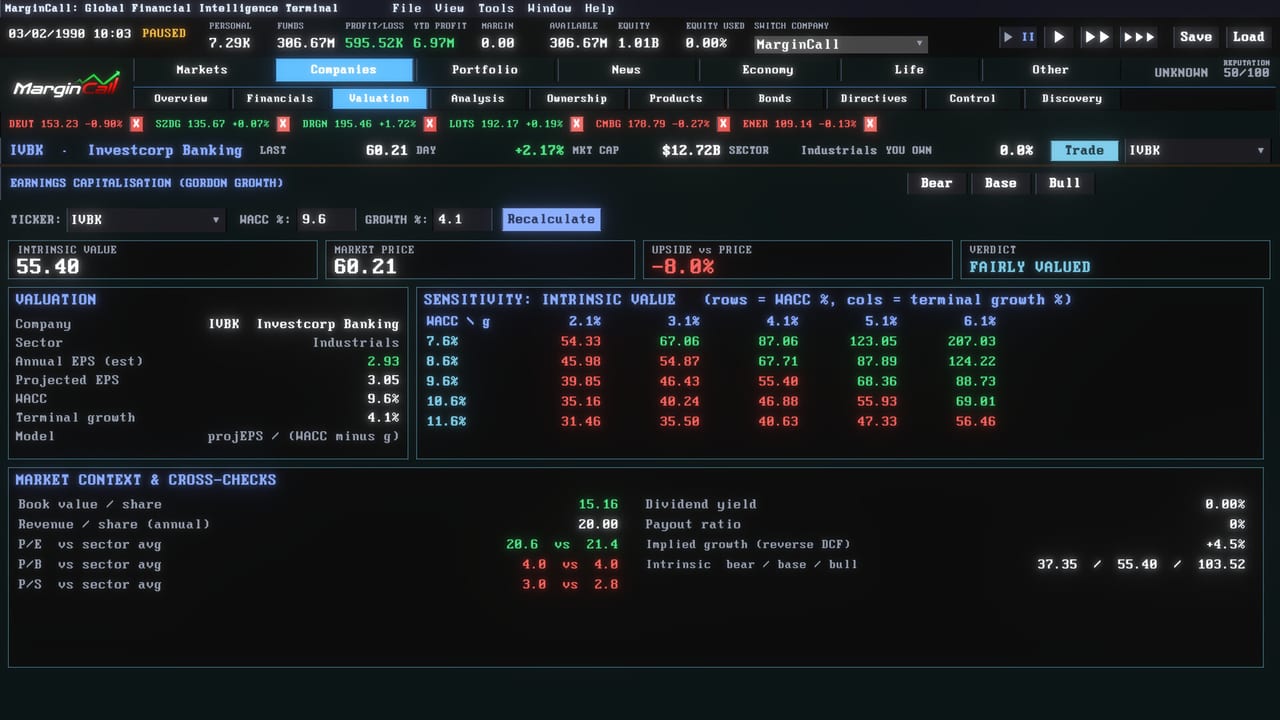
Most rage in a deep sim is navigation. MarginCall rebuilt the data terminal so screens share a framed, colour-coded language: green for gains, red for losses, amber for warnings. This page is a map, not a key-bind dump. Pair it with Getting Started if you still need the first-hour loop, and with How to Trade once you can find the ticket.
A full settings menu now lives on the main menu as well as in-game: General, Graphics, Audio, Accessibility, Language. CRT and Glow default to off. If the world looks like a broken television, you turned something back on.
Headline screens
Each rebuilt view opens with a band of the numbers that matter.
- Dashboard. Net worth, cash, profit. The duplicate clock is gone; the header already shows time.
- Risk. Where leverage and margin pressure should scare you before the monitor does. See How to Survive Margin Calls.
- Valuation. DCF-shaped thinking, not a scripted target. Bond yields now feed how companies are valued.
- Scanner and Screener. Hunting grounds. Use them, then write a thesis instead of clicking every name.
- Economy and Countries. Five blocs with rates, inflation, unemployment, and GDP. Country filters exist on Facilities. Business and consumer confidence now move with each country instead of sitting frozen.
- My Company, Financials, Analysis, Company. Income statements in daily, monthly, quarterly, and annual views. Arrow keys step between companies on a single-company screen so you can walk a watchlist without the mouse.
- Macro. Growth, inflation, rates. CPI and job prints live in the same family of headlines players mentioned in reviews.
- Connections. Ownership band. Required reading before a takeover.
- Life and Assets. Eat, stress, character assets, net-worth summary. Do not mash Eat while full.
- Scoreboard. Uses the same net-worth figure as the header. That was a patch goal, not a suggestion.
News in the sidebar was renamed NEW so the label fits. If a headline opens the wrong screen, that was a known flicker; check the destination before you trade the headline.
Charts and the trading page
The trading chart is a workstation. Roughly forty studies sit in one Indicators menu: moving averages, Bollinger, MACD, RSI, Stochastics, ATR, ADX, CCI, Ichimoku, SuperTrend, Keltner, Donchian, VWAP, Parabolic SAR, Vortex, Aroon, and more. Oscillators get their own pane. Modes include Candlestick, Heikin Ashi, Line, HLOC, Mountain, Hollow Candle, Step Line, and Baseline.
Drawing tools cover trend, ray, horizontal and vertical lines, arrow, rectangle, triangle, oval, channel, pitchfork, Fibonacci retracement and extension, Gann line and fan, head and shoulders, Elliott 12345 and ABC, measure, point to point, and text. Snap to bar prices, pin the toolbar, delete all, right-click undo. A horizontal crosshair carries a price tag. Drag tool borders to resize.
A left rail opens Positions, Orders, History, Alerts, News, and Analytics as overlays. Global Markets gained proper buy and sell tickets with live costs and P/L. Long-term charts for commodities, currencies, crypto, bonds, futures, and funds now keep daily, weekly, and monthly history across saves.
The chart used to advance unevenly at the fastest speed. It should now step steadily. If you still see lag at max speed, note it on known issues after you confirm you are not drawing forty studies on a potato GPU. Minimum spec is still a dual-core 2.5 GHz machine with 8 GB RAM and DirectX 11.
Ticket and table hygiene
Buy and Sell on the ticket should show a price. The limit-price hint should not run under the Bid button. Detail notes should not overlap the position panel. Tables in Chinese, Japanese, and Korean were patched to stay column-aligned; longer German strings grow the settings window instead of clipping tabs.
Pinned companies going off-screen showed up in discussions. Scroll, unpin, or use the arrow-key company walk. Confirmation dialogues are a separate thread; if you want a second click before a market order, check settings and do not assume a missing confirm is a missing order type.
Thesis notes
Notes save with the game. Each idea can carry conviction, a price target, and a stop. A live panel shows position, cost, P/L, price versus fair value, and performance since you wrote the card. Use them. The terminal will not remember why you bought a name at 2 a.m.
When the map is enough, go trade. When it is not, open the matching guide instead of opening every panel in a panic.
Frequently Asked Questions
Direct answers drawn from the same mechanics this wiki covers in depth.
Where is the settings menu?
On the main menu and in-game: General, Graphics, Audio, Accessibility, and Language. CRT and Glow default to off.
Can I move between companies without the mouse?
Yes. Up and down arrows step through names on single-company screens.
How many chart indicators are there?
Around forty in one Indicators menu, with oscillators in a separate pane and a full drawing toolbar.
The calendar opened twice or Eat charged me while full. Is that me?
Those were patched bugs. If they return, log them. Do not keep clicking Eat.